

• Link to X
  • Link to Facebook
  • Link to LinkedIn
  • Link to Mail
Contact Us | 202-236-2968 | 24/7 support | Privacy Policy
Connect4 Consulting
  • About
  • Portfolio
  • Website Design
    • Website Design Packages
    • Website Administration
    • Website Hosting, Backup, and Security
  • SEO
    • Local SEO
  • Testimonials
  • Blog
  • Click to open the search input field Click to open the search input field Search
  • Menu Menu
A bluejay blue jay bird in the snow with snowflakes on its beak.

Click-to-Tweet: How to Get Customers and Fans to Tweet On Your Behalf

February 7, 2018/in Social Media/by Gabriel Seiden

What if I told you that you could get customers and fans of your product or service to tweet about you on your behalf? You can do this by adding click-to-tweet functionality to your website. This will increase the number of posts linking back to your website on Twitter.

You can increase the number of posts linking back to your website on Twitter by highlighting snippets of text on each page or post and then empowering visitors to share those snippets by making it as simple as clicking a button.

Here’s a stat that will blow your mind: there are 6,000 tweets per second and 500 million tweets sent out every day. With all those tweets, what are the chances that anyone will see your posts?

Click-to-tweet is similar to user-generated content. You can get real customers and followers to share your website content on Twitter – expanding your reach on Twitter without having to do an excessive amount of work yourself.

What does Click-to-Tweet Functionality Look Like?

It’s not that hard to add click-to-tweet functionality to your website. Connect4 Consulting can do it for you. But there are options to choose from when integrating the functionality into your website. Let’s look at a few examples.

First there’s the traditional click-to-tweet box which looks like a quote callout box you might use to highlight an important line of text.
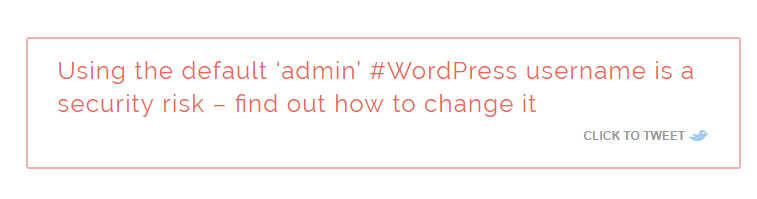
A great example of a straight-forward click to tweet box.

A great example of a straight-forward click to tweet box from Fiona Robertson’s website.

Flywheel also uses click-to-tweet on their website. Instead of a call-out box with borders, they use a highlighter to call attention to the tweetable text.

Flywheel’s example of click-to-tweet functionality.

Buffer has the least obtrusive click-to-tweet functionality. They just use a small “tweet” button after the tweetable facts and statistics.
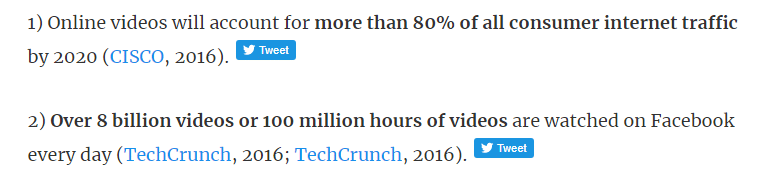
Buffer Example of Click-to-Tweet Functionality

Example of Click-to-Tweet Functionality from Buffer

Forbes uses a combination of the two examples above. The click-to-tweet quotes appear at first to only have a small Twitter icon next to them. If you move your mouse over the text, it becomes highlighted.

Forbes' Example of Click-to-Tweet Functionality

Example of Click-to-Tweet Functionality from Forbes.com

Click-to-Tweet Can Be Really Great For Your Website

The great thing about click-to-tweet is that users can hit “Tweet” and send the message as-is or customize it with their own message and hashtags. Click-to-tweet can be really good for your website:

  • It’s yet another way to use content to keep users engaged.
  • The recognizable twitter icons and call-out text attract attention and will improve engagement rates with your content.
  • It’s a cool way to call attention to the most important parts of your content as people scan quickly through it.
  • It provides alternative visual content if you don’t have time to find a photo for your text.
  • By including your Twitter handle within the click-to-tweet message, you are increasing awareness about your website AND your Twitter page.

We can set this up for your website. Get started on your click-to-tweet website upgrade now.


Share this entry
  • Share on Facebook
  • Share on X
  • Share on WhatsApp
  • Share on Pinterest
  • Share on LinkedIn
  • Share on Reddit
  • Share by Mail
https://connect4consulting.com/wp-content/uploads/2024/09/a-bluejay-blue-jay-bird-in-the-snow-with-snowflakes-on-its-beak-.jpg 2000 2000 Gabriel Seiden https://connect4consulting.com/wp-content/uploads/2013/04/Connect4Consulting_LO_FF_transparent1.png Gabriel Seiden2018-02-07 15:12:562024-09-03 21:19:26Click-to-Tweet: How to Get Customers and Fans to Tweet On Your Behalf
0 replies

Leave a Reply

Want to join the discussion?
Feel free to contribute!

Leave a Reply Cancel reply

Your email address will not be published. Required fields are marked *

Sign up for our
weekly technology and marketing newsletter

Recent Posts

  • The Free Digital Audit: What We Look For (And Why Most Sites Fail)
  • Beyond the Three Numbers: A Deeper GA4 Tutorial for Business Owners
  • How to Read a Google Analytics Traffic Report Without Getting a Headache
  • AI for the Reluctant: What Are ChatGPT, Claude, Perplexity, and Gemini Actually Good For?
  • No Platform is “Hack-Proof”

Tags

AEO AI AI overviews AI Search AI search visibility artificial intelligence backlinks blogging calls to action Connect4 Cyber Security Survival Guide content marketing Content Strategy Core Web Vitals cyber security Digital Marketing email marketing email marketing best practice GA4 Google Google Business Profile Google Search Console internal linking LastPass local seo managed WordPress care Mental Health Marketing online reviews phishing responsive design schema markup search engine optimization SEO small business Small Business Marketing small business website social media spear phishing user experience website design Website Maintenance Website Performance website security Wordpress wordpress plugins WordPress security

Sign up for our
weekly technology and marketing newsletter

Recent Posts

  • The Free Digital Audit: What We Look For (And Why Most Sites Fail)August 14, 2026 - 3:22 pm
  • AI for the Reluctant: What Are ChatGPT, Claude, Perplexity, and Gemini Actually Good For?August 7, 2026 - 2:57 pm
  • Six stylized website-platform icons in a row on a dark background, each protected by a shield of a different strength and style — some solid, some cracked, some minimal or transparent — visually conveying that every platform has a different security profile.
    No Platform is “Hack-Proof”August 5, 2026 - 1:38 pm
  • A dramatic digital countdown clock reading 05:00:00 in glowing red, centered on a dark background. Faint streams of red threat-vectors converge toward a stylized website admin screen behind the clock, held back at the edges by a thin translucent blue shield
    5 Hours to Exploit: The Terrifying Speed of Modern WordPress AttacksJuly 31, 2026 - 1:29 pm
  • A sleek, dark WordPress admin dashboard glowing at the center of the frame. Streams of jagged red-and-orange “bot code” flow inward from all edges toward the dashboard, stopping short against a translucent blue shield (brand blue #307ECC) that wraps the screen. Dramatic, high-contrast, modern cyber-security aesthetic with subtle blue rim lighting.
    The WordPress Security Crisis: Why Outdated Plugins Are an Open DoorJuly 28, 2026 - 1:29 pm
© Copyright 2026 - Connect4 Consulting
812 Elm Ave. Takoma Park, MD 20912
  • Link to X
  • Link to Facebook
  • Link to LinkedIn
  • Link to Mail
  • About
  • Portfolio
  • Website Design
  • SEO
  • Testimonials
  • Blog
Link to: Small Business SEO for 2018 – What You Need to Do to Rank High in 2018 Link to: Small Business SEO for 2018 – What You Need to Do to Rank High in 2018 Small Business SEO for 2018 – What You Need to Do to Rank High in 201...Percentage of Peak Period Downstream Traffic in North America, by application Link to: Why Do Hackers Attack Websites? Link to: Why Do Hackers Attack Websites? Computer hacker and cyber crimeWhy Do Hackers Attack Websites?
Scroll to top Scroll to top Scroll to top

This site uses cookies. By continuing to browse the site, you are agreeing to our use of cookies.

OKLearn more

Cookie and Privacy Settings


How we use cookies

We may request cookies to be set on your device. We use cookies to let us know when you visit our websites, how you interact with us, to enrich your user experience, and to customize your relationship with our website.

Click on the different category headings to find out more. You can also change some of your preferences. Note that blocking some types of cookies may impact your experience on our websites and the services we are able to offer.

Essential Website Cookies

These cookies are strictly necessary to provide you with services available through our website and to use some of its features.

Because these cookies are strictly necessary to deliver the website, refusing them will have impact how our site functions. You always can block or delete cookies by changing your browser settings and force blocking all cookies on this website. But this will always prompt you to accept/refuse cookies when revisiting our site.

We fully respect if you want to refuse cookies but to avoid asking you again and again kindly allow us to store a cookie for that. You are free to opt out any time or opt in for other cookies to get a better experience. If you refuse cookies we will remove all set cookies in our domain.

We provide you with a list of stored cookies on your computer in our domain so you can check what we stored. Due to security reasons we are not able to show or modify cookies from other domains. You can check these in your browser security settings.

Google Analytics Cookies

These cookies collect information that is used either in aggregate form to help us understand how our website is being used or how effective our marketing campaigns are, or to help us customize our website and application for you in order to enhance your experience.

If you do not want that we track your visit to our site you can disable tracking in your browser here:

Other external services

We also use different external services like Google Webfonts, Google Maps, and external Video providers. Since these providers may collect personal data like your IP address we allow you to block them here. Please be aware that this might heavily reduce the functionality and appearance of our site. Changes will take effect once you reload the page.

Google Webfont Settings:

Google Map Settings:

Google reCaptcha Settings:

Vimeo and Youtube video embeds:

Other cookies

The following cookies are also needed - You can choose if you want to allow them:

Accept settingsHide notification only