
• Link to X
  • Link to Facebook
  • Link to LinkedIn
  • Link to Mail
Contact Us | 202-236-2968 | 24/7 support | Privacy Policy
Connect4 Consulting
  • About
  • Portfolio
  • Website Design
    • Website Design Packages
    • Website Administration
    • Website Hosting, Backup, and Security
  • SEO
    • Local SEO
  • Testimonials
  • Blog
  • Click to open the search input field Click to open the search input field Search
  • Menu Menu

How to Show Up in Local Search Results

November 19, 2017/in Local SEO/by Gabriel Seiden

Want to know how to show up in local search results? If you’re having trouble getting your business to show up in the Google local search results, you’re not alone. For starters, there’s a lot less territory there – with ads on the top and bottom of the page and online directories, there isn’t much room for small local businesses to show up on the first page of Google search results.

Complicating matters, Google has a local filter that can cause a business listing to drop out of local search results. This filter isn’t very different from websites ranking organically in search results. Ideally, the best sites win the top spots.

What causes a business to get filtered out of local search results?

There are a variety of factors that influence local search results. The following situations might cause a business to get filtered out of the local search results.

Proximity of the search is critical

Google now takes into consideration where the mobile searcher is physically located when they are performing the search. This means that local search results can also now depend on where the business is physically located when the search is being done.

Select the Most Specific Google My Business Category

When you set up your Google My Business category for your listing, choose the most specific category that is appropriate and relevant to your business. You can see in the screenshot below that Len The Plumber has chosen Plumber for it’s Google My Business Category.
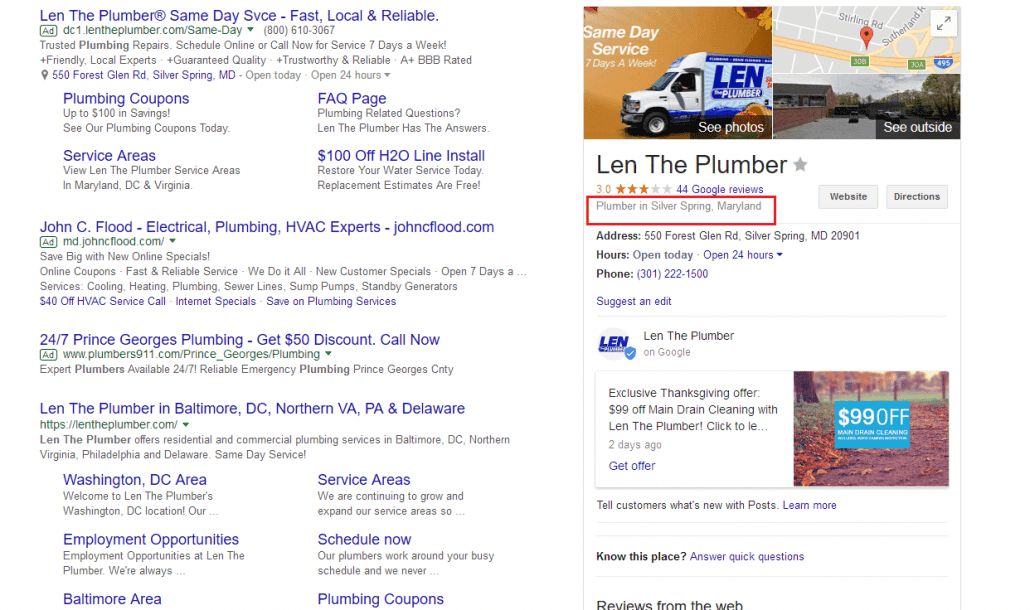
If you see your competitor outranking you, find out what category they are using and select the same category for your business. Look at all the other things they are doing to differentiate themselves online and copy what they are doing so you can outrank them.

Make sure you don’t select too many categories. More is not better. Too many categories can confuse Google to the point where it’s not sure what your company’s specialty is. Try removing the less specific categories.

Don’t Have the Same Physical Address as Your Competitors

If it’s possible, don’t have the same address as your competitors. This means that you should not list a virtual office or a UPS p.o. box store as your physical address. If you do this and there are competing businesses in the same location, there’s a good chance that you won’t appear in the local search results.

Multiple Practitioners Working in the Same Location

If you’re an attorney, accountant, doctor, cpa, or some other professional in an industry where there might be an office filled with people working in the same category, Google may filter out some of your practitioners’ listings? Google doesn’t want one business dominating the first page of Google local search results.

The workaround to this dilemma is that each practitioner’s Google My Business listing should have a different category (if possible) and should be directed to different URLS (either the person’s specific profile page or a page about their specialty – they should not all point to the business home page.

Another thing you can do to differentiate the practitioners is to make sure that each practitioner has his or her own unique phone number in the Google My Business listing.

See What Your Competitors Are Doing

If your business is not appearing in the Google local search results, see what your competitors are doing. Maybe they are doing something different or better than you – and you can learn from them. When you’re evaluating your competition, make sure you focus on the signals that help sites rank organically:

  • Do they have a better Google+ description?
  • Do they have more 5-star reviews?
  • Is their Google My Business listing completely filled out while yours is missing some information?
  • What is their business category? Is it different from the one you have selected?

Remember that Google just wants to show the best businesses first. If you truly compete head to head with your competition, and you follow the advice in this blog post, you will eventually appear in the Google local search results.

Related Google Local Search Blog Posts

At Connect4 Consulting our specialty is website design and internet marketing for small businesses. You might find these other local search related blog posts of use:

  • Why You Need to Optimize Your Google My Business Page
  • Five Problematic Local SEO Tactics
  • Avoid Local SEO Mistakes


Share this entry
  • Share on Facebook
  • Share on X
  • Share on WhatsApp
  • Share on Pinterest
  • Share on LinkedIn
  • Share on Reddit
  • Share by Mail
https://connect4consulting.com/wp-content/uploads/2017/11/Screenshot-2017-11-19-len-the-plumber-Google-Search.png 736 1242 Gabriel Seiden https://connect4consulting.com/wp-content/uploads/2013/04/Connect4Consulting_LO_FF_transparent1.png Gabriel Seiden2017-11-19 16:26:372017-11-19 16:32:50How to Show Up in Local Search Results
0 replies

Leave a Reply

Want to join the discussion?
Feel free to contribute!

Leave a Reply Cancel reply

Your email address will not be published. Required fields are marked *

Sign up for our
weekly technology and marketing newsletter

Recent Posts

  • Schema Markup: Teaching Google (and ChatGPT) to Read Your Site
  • Fewer Plugins, Less Risk: When Custom Code Beats Reaching for Another Plugin
  • How to Get Your Google Business Cited in AI Overviews (Not Just Ranked in Google)
  • Your Google Business Profile Is a 24/7 Storefront — Here’s How to Actually Run It
  • Stop Renting, Start Owning: Why Wix and Squarespace Are a Risk

Tags

AEO AI AI overviews AI Search AI search visibility backlinks blogging calls to action Connect4 Cyber Security Survival Guide content marketing Content Strategy Core Web Vitals cyber security Digital Marketing digital marketing strategy email marketing email marketing best practice GA4 Google Google Business Profile Google Search Console internal linking keep it simple LastPass lead generation local seo managed WordPress care Mental Health Marketing online reviews phishing schema markup search engine optimization SEO small business Small Business Marketing small business website small business websites social media user experience website design Website Maintenance website security Wordpress wordpress plugins WordPress security

Sign up for our
weekly technology and marketing newsletter

Recent Posts

  • A glowing restaurant menu with illuminated labels like "Appetizer" and "Price" tagging each item in brand blue, while unlabeled items fade into shadow, symbolizing how schema markup labels website content for search engines and AI.
    Schema Markup: Teaching Google (and ChatGPT) to Read Your SiteSeptember 8, 2026 - 11:12 am
  • Fewer Plugins, Less Risk: When Custom Code Beats Reaching for Another PluginSeptember 8, 2026 - 10:08 am
  • A translucent AI interface scanning a glowing document and lifting a single highlighted paragraph in brand blue off the page, while the rest of the text fades into shadow, symbolizing an AI system extracting one citable answer from a website.
    How to Get Your Google Business Cited in AI Overviews (Not Just Ranked in Google)September 4, 2026 - 11:12 am
  • A glowing storefront window made of light on a dark city street at night, displaying a star rating, map pin, and review icons in brand blue, symbolizing a Google Business Profile that stays visible around the clock.
    Your Google Business Profile Is a 24/7 Storefront — Here’s How to Actually Run ItSeptember 4, 2026 - 10:59 am
  • Stop Renting, Start Owning: Why Wix and Squarespace Are a RiskSeptember 2, 2026 - 9:46 am
© Copyright 2026 - Connect4 Consulting
812 Elm Ave. Takoma Park, MD 20912
  • Link to X
  • Link to Facebook
  • Link to LinkedIn
  • Link to Mail
  • About
  • Portfolio
  • Website Design
  • SEO
  • Testimonials
  • Blog
Link to: The New Firefox Quantum Browser is Ridiculously Fast Link to: The New Firefox Quantum Browser is Ridiculously Fast The New Firefox Quantum Browser is Ridiculously FastFirefox Quantum Link to: Do you have more 5-star reviews than your competitors? Link to: Do you have more 5-star reviews than your competitors? Connect4 Consulting Google ReviewsDo you have more 5-star reviews than your competitors?
Scroll to top Scroll to top Scroll to top

This site uses cookies. By continuing to browse the site, you are agreeing to our use of cookies.

OKLearn more

Cookie and Privacy Settings


How we use cookies

We may request cookies to be set on your device. We use cookies to let us know when you visit our websites, how you interact with us, to enrich your user experience, and to customize your relationship with our website.

Click on the different category headings to find out more. You can also change some of your preferences. Note that blocking some types of cookies may impact your experience on our websites and the services we are able to offer.

Essential Website Cookies

These cookies are strictly necessary to provide you with services available through our website and to use some of its features.

Because these cookies are strictly necessary to deliver the website, refusing them will have impact how our site functions. You always can block or delete cookies by changing your browser settings and force blocking all cookies on this website. But this will always prompt you to accept/refuse cookies when revisiting our site.

We fully respect if you want to refuse cookies but to avoid asking you again and again kindly allow us to store a cookie for that. You are free to opt out any time or opt in for other cookies to get a better experience. If you refuse cookies we will remove all set cookies in our domain.

We provide you with a list of stored cookies on your computer in our domain so you can check what we stored. Due to security reasons we are not able to show or modify cookies from other domains. You can check these in your browser security settings.

Google Analytics Cookies

These cookies collect information that is used either in aggregate form to help us understand how our website is being used or how effective our marketing campaigns are, or to help us customize our website and application for you in order to enhance your experience.

If you do not want that we track your visit to our site you can disable tracking in your browser here:

Other external services

We also use different external services like Google Webfonts, Google Maps, and external Video providers. Since these providers may collect personal data like your IP address we allow you to block them here. Please be aware that this might heavily reduce the functionality and appearance of our site. Changes will take effect once you reload the page.

Google Webfont Settings:

Google Map Settings:

Google reCaptcha Settings:

Vimeo and Youtube video embeds:

Other cookies

The following cookies are also needed - You can choose if you want to allow them:

Accept settingsHide notification only