
• Link to X
  • Link to Facebook
  • Link to LinkedIn
  • Link to Mail
Contact Us | 202-236-2968 | 24/7 support | Privacy Policy
Connect4 Consulting
  • About
  • Portfolio
  • Website Design
    • Website Design Packages
    • Website Administration
    • Website Hosting, Backup, and Security
  • SEO
    • Local SEO
  • Testimonials
  • Blog
  • Click to open the search input field Click to open the search input field Search
  • Menu Menu
a torn paper written with inscription spam on a green background

What is SEO Spam and How to Remove It

February 28, 2020/in Hackers, How To, SEO/by Gabriel Seiden

SEO Spam, also called Spamdexing, is the practice of search engine spamming. SEO spam involves a number of methods, such as link building and repeating unrelated phrases, to manipulate the relevance or prominence of search terms indexed by search engines. Search engine spam is an attempt to change search engine rankings so that website traffic is redirected to a scam designed by a hacker. To do this, hackers gain access to a normal, healthy website, and then inject keywords and links to another website they have set up that is designed to defraud people.

Victims believe they are going to a legitimate website to buy something – usually male enhancement drugs, designer clothing, or sports gear – but they actually get scammed.

Hackers don’t create their own sites because the search engine algorithms are already good enough that they ignore the scam websites. By gaining access to legitimate websites and injecting links and keywords, hackers create a direct path to their scam websites. These hackers are piggybacking on your legitimate website ranking to get noticed.

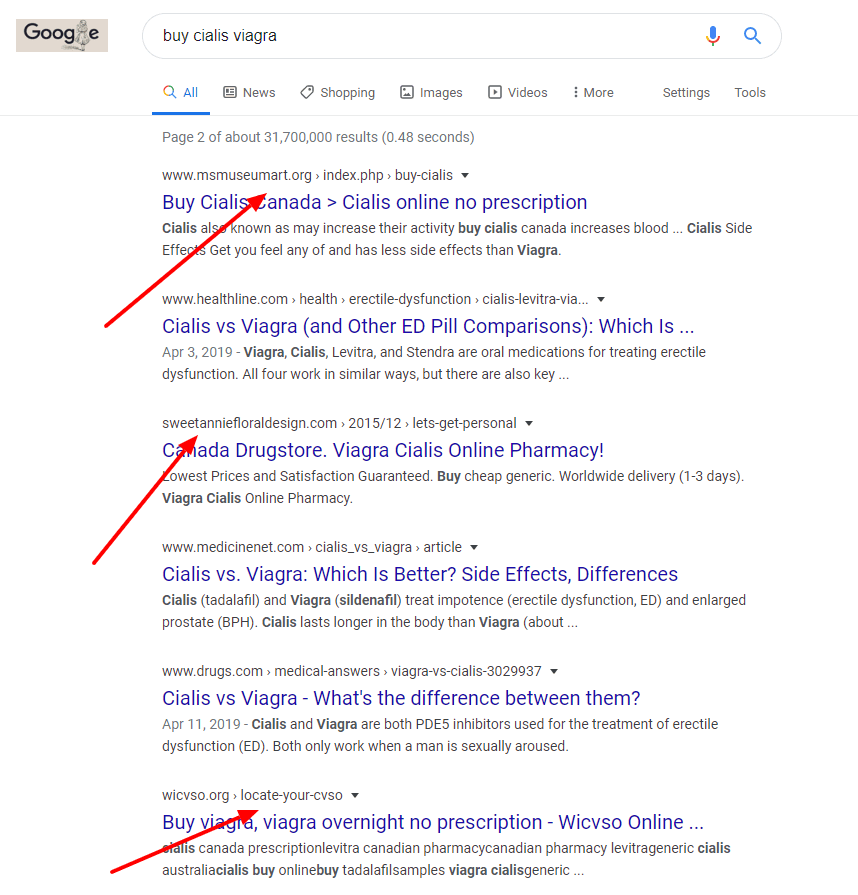
A good way to understand this better is to open up your favorite browser and search with the terms “buy viagra cialis”. You may not want to do this at the office.

Now, without clicking anything, scroll through the results. Doesn’t it seem strange that the top result is a page on a museum shopping site? The third result is a page on a florist website. The last result is a page on the County Veterans Service Officers of Wisconsin. These are all examples of websites that have been hacked for spamdexing.
What types of SEO Spam are there?

Spammy links

Links are critically important to scammers. Without the links, there is no way to drive traffic to their scam website.

Spammy keywords

When shady keywords appear in the content of a credible website, search engines assume that it’s safe to index the site for those terms. And when people search online – for medicine, male enhancement drugs, sports gear, loan services, etc. – search results often include scams where the buyer pays for something she never receives.

Spammy ads

Sometimes a hacked website includes banner ads or calls to action (CTAs) that directs traffic to their scam website. This can be a fairly effective scam – especially if the hacker has hacked the code behind the call to action.

Spammy posts and pages

This is the worst case example. When a legitimate site already has a good search engine ranking, the hackers will create fake posts and pages dedicated to ranking for a spammy search term.

How can I protect my website from SEO spam?

Unfortunately spamdexing is always a threat for website owners, but the best way to defend yourself from these hackers is by strictly adhering to a few best practices:

  • Run updates – plugins and themes need updates constantly. Don’t ignore these. Updates almost always include security patches to keep hackers out. Without these updates, your entire website has an open backdoor for an SEO spamdexing.
  • Create strong passwords – easy passwords like pass1234 might be easy to remember, but unfortunately they are also too easy to guess. Make sure you are using strong passwords when they are protecting access to your website.
  • Create strong usernames – don’t use admin or administrator as your username.
  • Use a firewall – if you’re serious about preventing spamdexing on your website, a web application firewall is an absolute must-have. It protects you by updating definitions of known threats, kind of like a bouncer at a bar.
  • Scan regularly – the first step to fixing an SEO spam infection is to be aware of it. Too often, website owners have no idea they have been hacked until it’s too late.
  • Make sure your site is backed up – if you do get hacked, it’s always good to have a backup – just make sure the backup goes back before the hack.
  • Hire someone to do this if you don’t know how to yourself – this is the most important best practice on the list. Don’t step over dollars to pick up a penny. If you don’t know how to do all this or know that you won’t do it on a regular basis, hire someone to adhere to these best practices to defend yourself from seo spam.

What if I already have an SEO spam infection?

If your website is already infected with SEO spam, it is very important that you act quickly. This will not fix itself and it’s not a task that you can put off until you have time.

Every second that your website remains infected with SEO spam, you risk serious penalties. You could get blacklisted by search engines so you don’t show up in search results even after you clean your site. Or worse, your customers could go to your website to do business, see the SEO spam, and then never return.

Be patient. Removing SEO spam can take time. If you’re infected, fix it now and protect your visitors and your reputation. And if you don’t have SEO spam, make sure you are protecting yourself by following the best practices listed above.


Share this entry
  • Share on Facebook
  • Share on X
  • Share on WhatsApp
  • Share on Pinterest
  • Share on LinkedIn
  • Share on Reddit
  • Share by Mail
https://connect4consulting.com/wp-content/uploads/2024/09/a-torn-paper-written-with-inscription-spam-on-a-green-background.jpg 1228 2000 Gabriel Seiden https://connect4consulting.com/wp-content/uploads/2013/04/Connect4Consulting_LO_FF_transparent1.png Gabriel Seiden2020-02-28 22:27:282024-09-03 21:51:15What is SEO Spam and How to Remove It

Sign up for our
weekly technology and marketing newsletter

Recent Posts

  • Schema Markup: Teaching Google (and ChatGPT) to Read Your Site
  • Fewer Plugins, Less Risk: When Custom Code Beats Reaching for Another Plugin
  • How to Get Your Google Business Cited in AI Overviews (Not Just Ranked in Google)
  • Your Google Business Profile Is a 24/7 Storefront — Here’s How to Actually Run It
  • Stop Renting, Start Owning: Why Wix and Squarespace Are a Risk

Tags

AEO AI AI overviews AI Search AI search visibility backlinks blogging calls to action Connect4 Cyber Security Survival Guide content marketing Content Strategy Core Web Vitals cyber security Digital Marketing digital marketing strategy email marketing email marketing best practice GA4 Google Google Business Profile Google Search Console internal linking keep it simple LastPass lead generation local seo managed WordPress care Mental Health Marketing online reviews phishing schema markup search engine optimization SEO small business Small Business Marketing small business website small business websites social media user experience website design Website Maintenance website security Wordpress wordpress plugins WordPress security

Sign up for our
weekly technology and marketing newsletter

Recent Posts

  • A glowing restaurant menu with illuminated labels like "Appetizer" and "Price" tagging each item in brand blue, while unlabeled items fade into shadow, symbolizing how schema markup labels website content for search engines and AI.
    Schema Markup: Teaching Google (and ChatGPT) to Read Your SiteSeptember 8, 2026 - 11:12 am
  • Fewer Plugins, Less Risk: When Custom Code Beats Reaching for Another PluginSeptember 8, 2026 - 10:08 am
  • A translucent AI interface scanning a glowing document and lifting a single highlighted paragraph in brand blue off the page, while the rest of the text fades into shadow, symbolizing an AI system extracting one citable answer from a website.
    How to Get Your Google Business Cited in AI Overviews (Not Just Ranked in Google)September 4, 2026 - 11:12 am
  • A glowing storefront window made of light on a dark city street at night, displaying a star rating, map pin, and review icons in brand blue, symbolizing a Google Business Profile that stays visible around the clock.
    Your Google Business Profile Is a 24/7 Storefront — Here’s How to Actually Run ItSeptember 4, 2026 - 10:59 am
  • Stop Renting, Start Owning: Why Wix and Squarespace Are a RiskSeptember 2, 2026 - 9:46 am
© Copyright 2026 - Connect4 Consulting
812 Elm Ave. Takoma Park, MD 20912
  • Link to X
  • Link to Facebook
  • Link to LinkedIn
  • Link to Mail
  • About
  • Portfolio
  • Website Design
  • SEO
  • Testimonials
  • Blog
Link to: Top Website Development Trends for 2020 Link to: Top Website Development Trends for 2020 Top Website Development Trends for 2020time on 2020 blocks, new year concept Link to: COVID-19 Marketing Tips for Small Businesses Link to: COVID-19 Marketing Tips for Small Businesses covid-19COVID-19 Marketing Tips for Small Businesses
Scroll to top Scroll to top Scroll to top

This site uses cookies. By continuing to browse the site, you are agreeing to our use of cookies.

OKLearn more

Cookie and Privacy Settings


How we use cookies

We may request cookies to be set on your device. We use cookies to let us know when you visit our websites, how you interact with us, to enrich your user experience, and to customize your relationship with our website.

Click on the different category headings to find out more. You can also change some of your preferences. Note that blocking some types of cookies may impact your experience on our websites and the services we are able to offer.

Essential Website Cookies

These cookies are strictly necessary to provide you with services available through our website and to use some of its features.

Because these cookies are strictly necessary to deliver the website, refusing them will have impact how our site functions. You always can block or delete cookies by changing your browser settings and force blocking all cookies on this website. But this will always prompt you to accept/refuse cookies when revisiting our site.

We fully respect if you want to refuse cookies but to avoid asking you again and again kindly allow us to store a cookie for that. You are free to opt out any time or opt in for other cookies to get a better experience. If you refuse cookies we will remove all set cookies in our domain.

We provide you with a list of stored cookies on your computer in our domain so you can check what we stored. Due to security reasons we are not able to show or modify cookies from other domains. You can check these in your browser security settings.

Google Analytics Cookies

These cookies collect information that is used either in aggregate form to help us understand how our website is being used or how effective our marketing campaigns are, or to help us customize our website and application for you in order to enhance your experience.

If you do not want that we track your visit to our site you can disable tracking in your browser here:

Other external services

We also use different external services like Google Webfonts, Google Maps, and external Video providers. Since these providers may collect personal data like your IP address we allow you to block them here. Please be aware that this might heavily reduce the functionality and appearance of our site. Changes will take effect once you reload the page.

Google Webfont Settings:

Google Map Settings:

Google reCaptcha Settings:

Vimeo and Youtube video embeds:

Other cookies

The following cookies are also needed - You can choose if you want to allow them:

Accept settingsHide notification only